
Forensic Value of Windows Prefetch Artifacts
The Windows Prefetch system, located in C:\Windows\Prefetch, is one of the most
reliable artifacts for proving application execution on a Windows machine. Originally designed to
speed up application launch times by pre-loading necessary data into memory, Prefetch files
(.pf) inadvertently became a cornerstone of modern digital forensics.
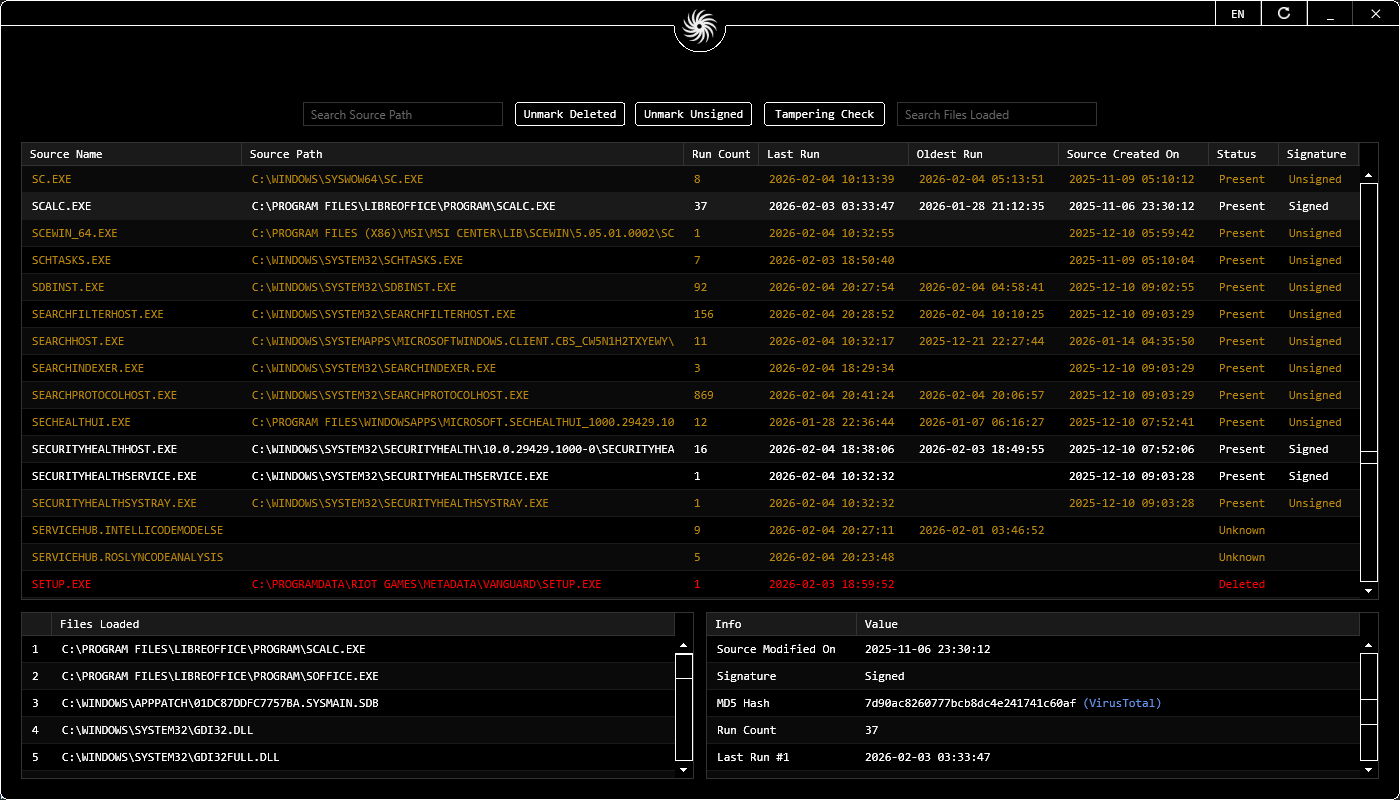
Our Windows Prefetch Tool is designed to decompress and interpret these files, which in modern versions of Windows (10 and 11) are often compressed using the "MAM" algorithm. Without a dedicated .pf parser like Vortex, these files are unreadable to the human eye. By decompressing this data, Vortex reveals the execution count, the last eight execution timestamps, and a detailed list of every file and directory the application touched during its first 10 seconds of launch.
Uncovering the Execution Timeline
When an examiner looks at a system, they aren't just looking for "what" was run, but "when" and "how often." The forensic triage utility in Vortex Prefetch extracts these timestamps with millisecond precision. This data is critical for correlating user activity with system events. If a piece of ransomware was executed, the Prefetch file will not only confirm the execution but also point to the specific directories the ransomware accessed—providing a roadmap for the scope of the encryption.
- MAM Decompression: Native support for the LZX-based compression used in modern Windows Prefetch files.
- Execution Counts: Track how many times a suspicious tool was used, differentiating between a one-time accidental click and habitual use.
- Volume Information: Identify which drives or network shares were mapped when the application was executed.
- Directory Dependencies: See which DLLs and configuration files were loaded, helping to identify "DLL sideloading" attacks.
.pf File Decompressor & MAM Compression Tool
Vortex Prefetch is a specialized .pf file decompressor and MAM Compression Tool that natively handles the modern formats used by the Windows Cache Manager:
- MAM Decompression Software: Decompress LZX-compressed Prefetch files in Windows 10 and 11 to reveal raw metadata.
- Execution Counter Parser: Extract the "Run Count" artifact to determine exactly how many times a program was launched.
- Run-Time Utility: Recover all eight execution timestamps embedded in the Prefetch header for millisecond-perfect timelines.
- Volume & Device Mapping Tool: Link application execution to specific storage volumes, including network shares and USB drives.
Prefetch Forensic Artifact Support
| Artifact | Forensic Value | Vortex Support |
|---|---|---|
| MAM Decompression | Read compressed .pf artifacts | Full Native Support |
| Run Count | Evidence of repeated use | Verified Counter |
| Last 8 Timestamps | Detailed execution timeline | Millisecond Resolution |
| File Dependencies | Identifying loaded DLLs/Resources | Full Path Mapping |
| Volume IDs | Origin drive identification | GUID Correlation |
Note: To understand the decompression logic and header structures in detail, refer to our Prefetch Forensic Repository Article.